Thursday, October 15, 2026

Aspect ratio crop calculator: see how many pixels you keep

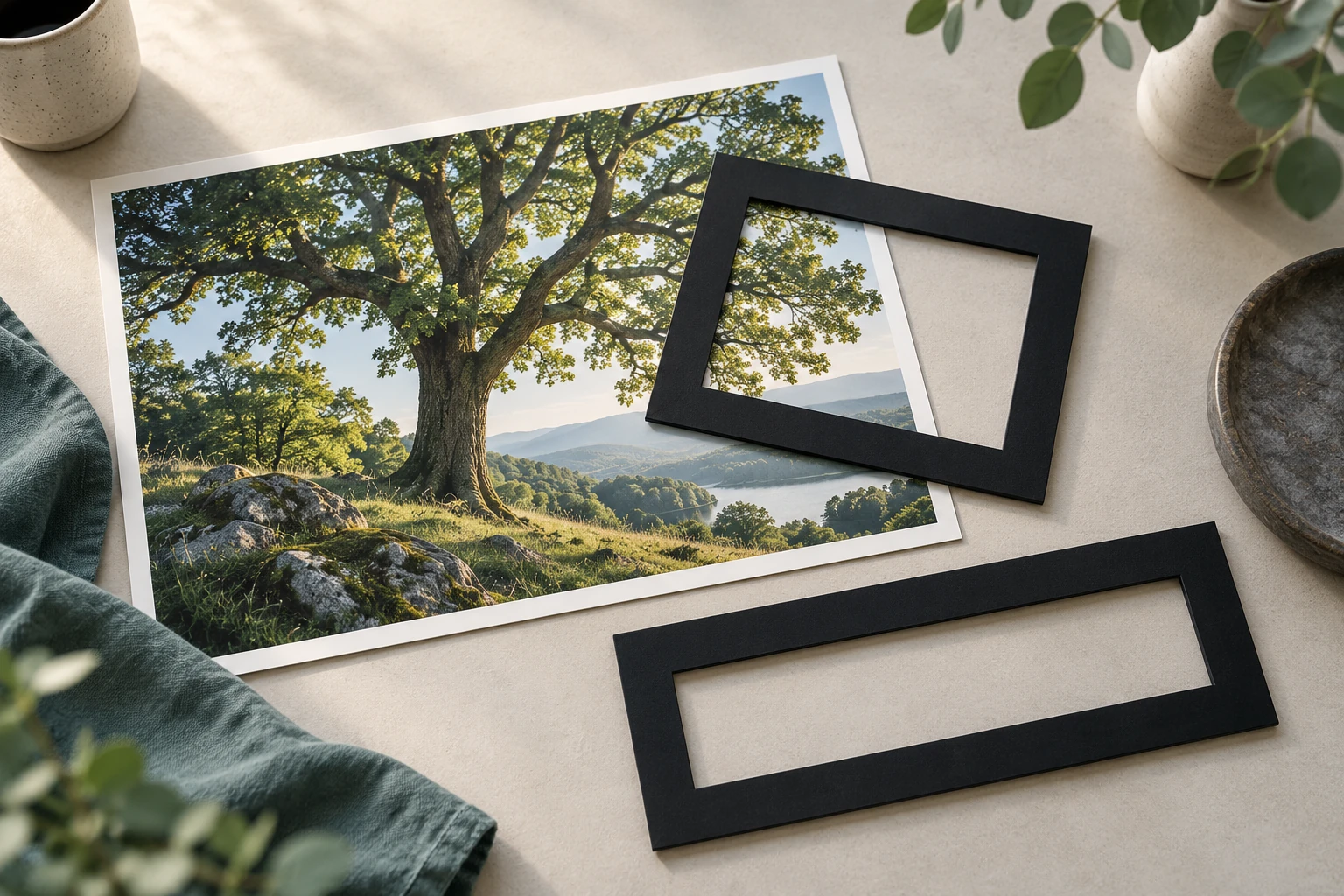
Photograph with two empty crop frames

To fill a frame with a different shape from your image, you must crop part of the image or add space around it. The calculator below finds the largest crop that fits inside your source at a chosen width-to-height ratio. It reports the dimensions and the approximate percentage of original pixels retained.

A ratio describes shape, not size. A 16:9 image could be 1,600 × 900 pixels or 3,200 × 1,800 pixels. Both are wider relative to their height than a 4:3 image. Decide the target orientation first: 9:16 is a portrait shape, while 16:9 is landscape.

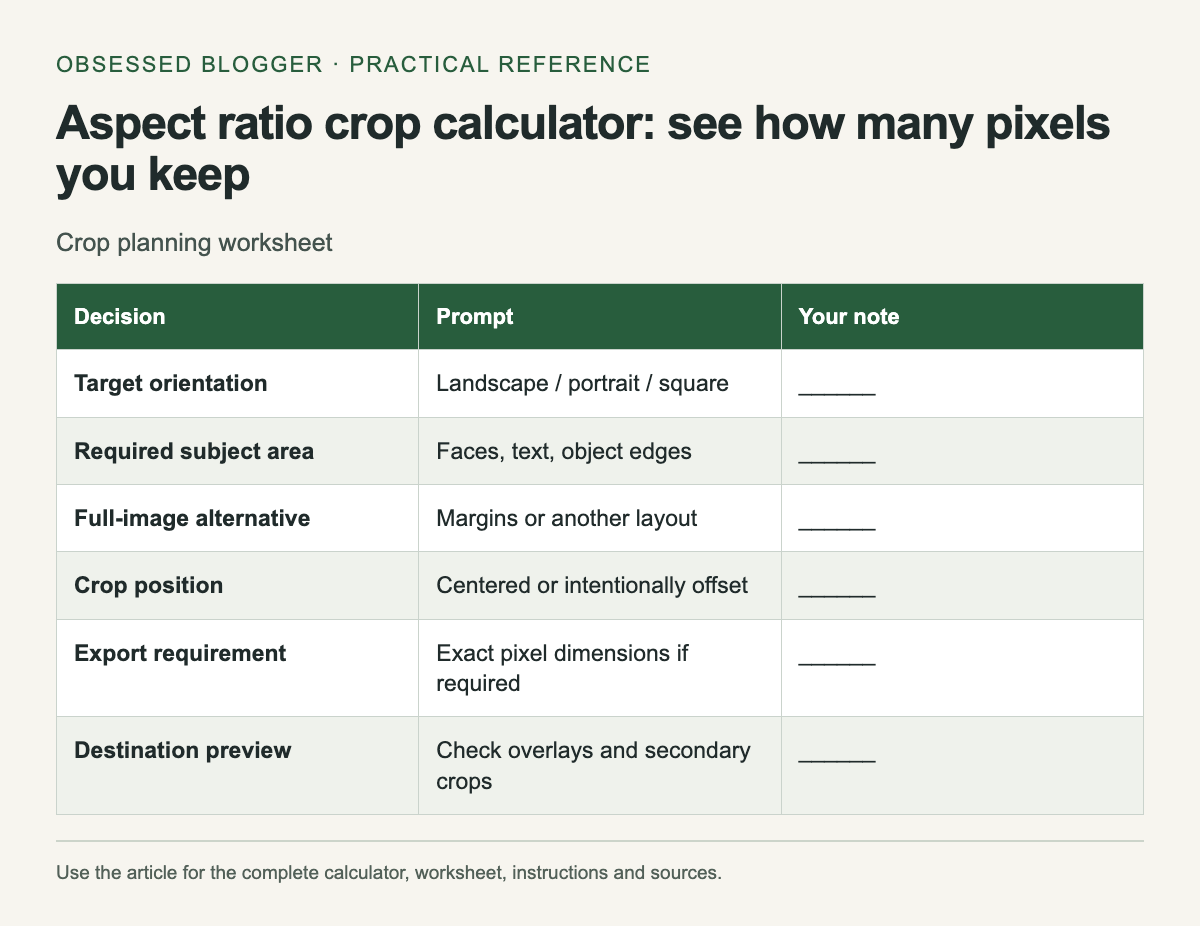
Crop planning worksheet. The complete instructions and accessible tool follow in the article.
Reference graphic from this guide. The complete instructions and tool, where available, remain in the article.

Work through one crop

Take an illustrative 4,000 × 3,000 pixel photograph and a target of 16:9. Keeping the full 4,000-pixel width gives a crop height of 4,000 × 9 ÷ 16 = 2,250 pixels. That removes 750 pixels of height in total and retains 75% of the original pixel area.

A centered crop would remove 375 pixels from the top and 375 from the bottom. You do not have to center it. If the subject sits high in the photograph, moving the crop upward may preserve the face while removing more foreground. The arithmetic describes the rectangle; you still choose its position.

Choose which edge limits the crop

Divide source width by source height and compare the result with target width divided by target height. If the source is relatively wider, keep its height and reduce its width. If the source is relatively taller, keep its width and reduce its height.

The calculator rounds the computed dimensions to the nearest pixel. Some ratios cannot fit perfectly at that size using whole pixels. If your destination demands exact integer dimensions, use its stated width and height for the final export and inspect the resulting crop. A one-pixel rounding difference should not silently replace a strict upload requirement.

Preserve the subject before exporting

Mark what cannot be lost: a person's face, a product label, the ends of a drawing or space for a caption. Then place the crop around those constraints. If the required content does not fit, choose a different photograph, a different layout or a background treatment that keeps the whole image visible.

Do not stretch one axis to force the photograph into the frame. A distorted circle or face may be more distracting than empty margins. If you add a background, make the editorial choice clear when it changes the meaning of the image, especially for documentary material.

Distinguish cropping from resizing

Cropping discards part of the image; resizing changes its pixel dimensions. Adobe's resolution guidance explains the separate role of resampling when changing pixel counts. Decide the composition first, then prepare the output dimensions required by the destination.

Keep the original file and save the crop as a derivative with a descriptive suffix, such as garden-16x9.jpg. That gives you room to make a portrait version later. Repeatedly editing the only copy makes future formats harder to produce.

Review the final placement

Open the exported file at its actual display size. Check that interface overlays, captions or frame edges do not cover the important area. A social preview may crop again, so inspect the destination's preview before sharing. The worksheet below is a quick way to make those decisions explicit when preparing several versions of one image.

Crop planning worksheet
DecisionPromptYour note
Target orientationLandscape / portrait / square______
Required subject areaFaces, text, object edges______
Full-image alternativeMargins or another layout______
Crop positionCentered or intentionally offset______
Export requirementExact pixel dimensions if required______
Destination previewCheck overlays and secondary crops______

Calculate your result

Example: 4,000 × 3,000 to 16:9 gives 4,000 × 2,250 pixels, retaining 75%.

Values stay in this page. The worked example also works without JavaScript.

Sources

Pixels to print size: calculate inches, centimeters and PPI

Two sizes of a mountain photograph beside a ruler

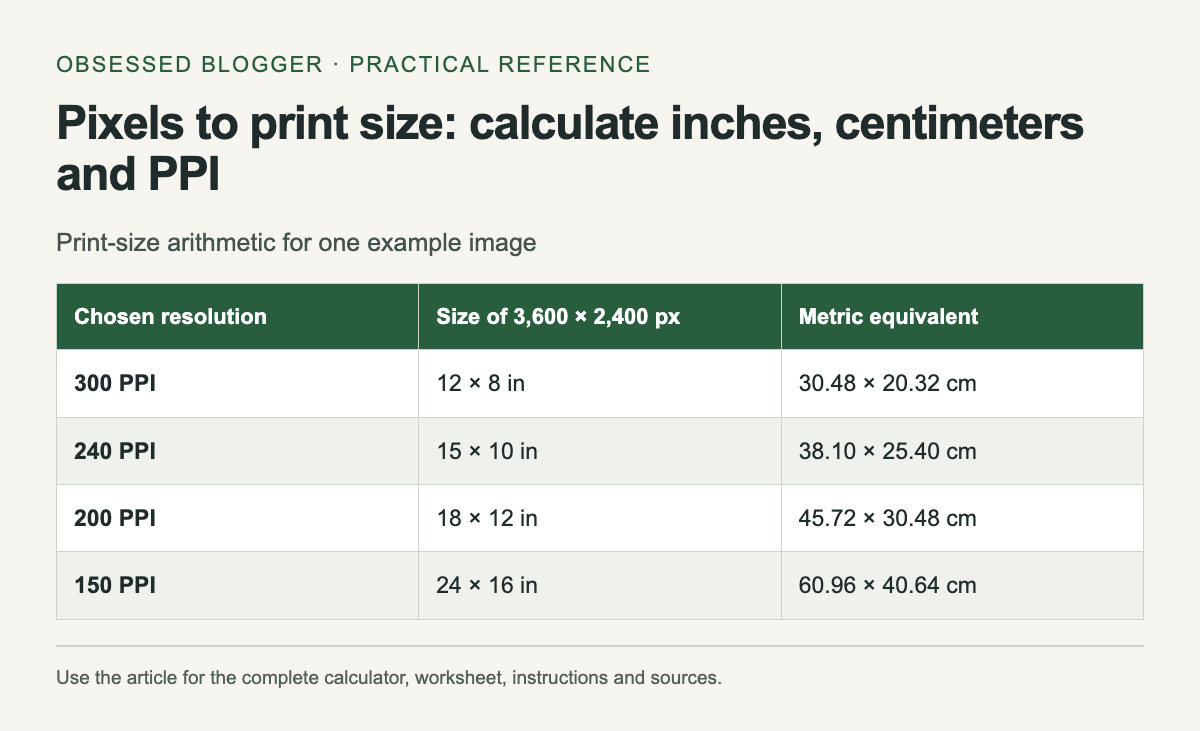
Divide an image's pixel dimensions by the chosen pixels per inch to calculate its print size. A 3,600 × 2,400 pixel file at 300 PPI gives 12 × 8 inches, or 30.48 × 20.32 cm. Those dimensions describe how the existing pixels map onto paper. They do not guarantee a particular level of photographic detail.

The calculator below keeps the original pixel count fixed. Enter the width and height shown in the file's properties, then enter the PPI requested by your print service. Use the result to choose a print size or discover whether a planned print needs a different source file.

Print-size arithmetic for one example image. The complete instructions and accessible tool follow in the article.
Reference graphic from this guide. The complete instructions and tool, where available, remain in the article.

Read the actual pixel dimensions

Use the original downloaded or exported file. A preview inside a messaging app may be smaller than the original, and a screenshot of a photo includes only the pixels captured on screen. Check the specific file you intend to upload, including whether it has already been cropped.

Do not use the file size in megabytes to infer print dimensions. Two images with identical pixel dimensions can have different compressed file sizes. Likewise, a large file can contain blur, compression artifacts or empty space. Pixel count is useful planning information; it is only one part of evaluating the image.

Separate resolution metadata from resampling

Adobe's print-dimension guidance distinguishes changing print dimensions and resolution from resampling. With resampling off, the existing pixels are distributed over a different physical size. Increasing the PPI value alone does not create additional captured detail.

For example, the same 3,600-pixel width corresponds to 12 inches at 300 PPI and 18 inches at 200 PPI. The larger placement has fewer source pixels per inch. That arithmetic does not establish whether the larger print is acceptable for your viewing distance, image content and printing process.

Work backward from a frame

Multiply the required inches by the requested PPI to find the pixel dimensions. An illustrative 10 × 8 inch image at 300 PPI needs 3,000 × 2,400 pixels for that mapping. If your file is 3,600 × 2,400, its shape differs: fitting the whole image creates unused space, while filling the area requires cropping.

Decide that crop before calculating final PPI. Removing pixels from the sides can change the available print size. Keep a copy of the uncropped original and export a separate version for the chosen frame. Include any bleed only according to the print service's template; the frame opening and the production canvas are not always identical.

Check the image at the intended use

Inspect faces, fine lettering and edges in the final export. If a flaw matters at the size people will see, a higher number in the resolution field will not fix it. Ask the print provider for its file requirements and proof options when the output is expensive or color-critical.

For a home test, print a small crop at the intended scale instead of shrinking the entire poster to a sheet. This preserves the scale of the detail you are judging. Label the test with its source dimensions, output size and settings so a second version can be compared fairly.

Keep the calculation with the order

Record source pixels, crop, requested print size and resulting PPI together. Round dimensions only when deciding the physical size; keep the full values during the calculation. The table shows the same hypothetical source at several PPI settings, so you can see the tradeoff without mistaking any one setting for a universal printing rule.

Print-size arithmetic for one example image
Chosen resolutionSize of 3,600 × 2,400 pxMetric equivalent
300 PPI12 × 8 in30.48 × 20.32 cm
240 PPI15 × 10 in38.10 × 25.40 cm
200 PPI18 × 12 in45.72 × 30.48 cm
150 PPI24 × 16 in60.96 × 40.64 cm

Sources

Wednesday, September 17, 2008

Friendly Post: New Games from Zheke

Ok. Put aside your work and give yourself some time to relax.

Find out some fresh and addictive games from the BigFish guys.


Bakery dreams come true! You will help Jill open her own bakery, bring in customers, and earn enough money to re-open her grandparents' bakery! With 48 levels and four different bakeries, Cake Mania is full of mouth-watering fun time management game. Let's get cookin' and let's start having some fun!

Hidden object mystery games are so popular these days that developers can't seem to make them fast enough to keep up with the demand! The latest seek-and-find whodunit is Mystery Chronicles: A Murder Among Friends, a game that puts your sleuthing and puzzle-solving skills to the test in 19th-century France.

With just over a year in the making, Azada: Ancient Magic, the sequel to the enormously successful adventure/hidden object hybrid Azada, has finally arrived!

Friday, March 21, 2008

Creative Food Artworks

I've decided to collect some creative sculptures made from fruits, bread and other edible stuff ) You've seen some of them, but I can bet most of them will be new for you.

152169_news_photo_image_large_61019

03388_news_photo_image_large_61011

212199_news_photo_image_large_61016

254624_news_photo_image_large_61009

0272442_news_photo_image_large_61005

This guys are best apparently.

597479_news_photo_image_large_61013

932075_news_photo_image_large_61015

3237612_news_photo_image_large_61017

5925284_news_photo_image_large_61001

946017_news_photo_image_large_61000

Be natural ;)

Saturday, June 23, 2007

How To Become a (Real) Cyborg

The DIY Guide to Becoming a (Real) Cyborg

A scientific duo at Tel-Aviv University discovered this past month that the injection of a chemical stimulant into an artificial culture of live neurons at crucial points in time could create an environment that can store multiple rudimentary memories. (which is considered to be a critical step towards cyborg-like integration of living material into memory chips.) While many individuals might be disturbed about the fact that artificial intelligence has become a reality, advocates might applaud the scientists' conclusion that chemical stimulation may be crucial to learning and memory formation in living organisms. Still other individuals might wonder if a middle ground in this debate about artificial intelligence is possible, or if any semblance of humor can be injected into a serious subject to lighten the atmosphere.

Individuals who resist the artificial intelligence development often believe that this technology bodes nothing but evil, especially if research falls into nefarious hands. Others are grateful for this research. Witness Jesse Sullivan, an electrician who accidentally touched an active cable that contained 7,000-7,500 volts of electricity in 2001 and, as a result, lost both arms at the shoulder. Since then, he's become the recipient of a 'bionic arm' created by scientists at the Rehabilitation Institute of Chicago. His experience, while truly unique, may help others lead active lives in the near future with these life-like prostheses.
The middle ground, perhaps, comes when society realizes that progress is inevitable, "evil" may exist alongside altruism, and — while hindsight is 20/20 — a little foresight and humor can help to create a gray area for a future where machines may outsmart a Mensa member. Even if you live on a limited budget, you can try a few of the following ideas on for size. Who knows? You might decide that you enjoy being less human and more resistant to all the limitations that the flesh endures.

1. RFID Implants

Perhaps the closest any average individual can come to cyborg-like transformation is through an RFID (Radio Frequency ID) transplant. When Amal Graafstra implanted an RFID chip into his left hand in 2005, he didn't break any laws, but he did raise some eyebrows. Since 2005, Graafstra's implants (now one in each hand), have ceased to engender shock. At first, many people wondered why Graafstra would consent to implant a chip in his hand merely to gain access to his locked doors without a key. Now, people agree to implants to gain access to nightclubs.
Many individuals have discovered that when there's a will, there's a way to accomplish the task at hand (so to speak). Mikey Sklar, a third-generation geek, "chipped" his own hand for only $105.49. If you grow woozy at the thought of self-surgery, the price of a tattoo artist who can commit the deed would be considerably less expensive than the cost of a surgeon.
With that said, the price of healing an infection could ravage your savings when you implant a chip without professional guidance. Do your research first, as you'll learn that the antennae needs to face forward unless you want to learn how to become a contortionist as well as a semi-cyborg. Also, you might discover that phidgets (physical widgets) have emerged as low-security and low-price alternatives to RFID chips.

2.Talk to the Wired Hand

The Data Glove, or ShapeHand™, is a portable, lightweight, hand motion capture system composed of flexible ribbons that capture hand and finger motion. ShapeHand's flexible sensors are not physically built into a glove, so you can attach this technology to virtually any glove and hand size to export hand motion data into gaming engines and other enterprises.
You can go further with the ShapeHandPlus™, where the data glove is integrated with arm tracking ShapeTape. ShapeHandPlus tracks complete hand and arm movements and poses, including contortions you create when you implant your RFID antennae the wrong way.
You know that when you need to call or email for a price, as you do with this technology, that the price probably lands light-years beyond any normal budget. But, you can build your own DataGlove with a regular glove and raw materials found at any local RadioShack. A rough upper-limit cost for this glove could reach about $500; but if you have some of the components lying around (like an A to D converter), you could save at least $90.00.

3.Dress Accordingly

If the iJacket and iSuit don't represent your personality, you might go for a variety of shirts and T-shirts that can alter the way you look and feel. One example includes the Sound Activated Illuminated T-shirt ($48.65) that reacts to sound with bars that mimic an equalizer. The bars keep rhythm with any music, so you can stand still and just pretend like you're dancing. The Animated Retro Table Tennis shirt is a bit more complex, yet it can make you appear simple or make you disappear altogether if you're in a dark room. This T-shirt ($24.99), like the previous one, runs on a battery pack.

On days when you don't feel loved, you can wear the Hug Shirt. Embedded sensors and electronics react to a wireless mobile phone message that allows you to feel the physical closeness of a distant loved one as the shirt simulates the sensation of a hug. This shirt was developed by CuteCircuit, a company that specializes in wearable computing, including kinetic clothing that reacts to the wearer's activities and mood. These items are in test mode, and are not yet ready for sale.
While this technology can be fun, it can also be used for covert operations. Two students in Singapore developed textiles that use Electrochromism so that a uniform can blend into any surrounding. This invention is far more mobile than traditional attempts at camouflage.


(3D art by: Aleksey Mityshkin, Render.ru)
4. Refuse to Live with Your Genes
If you want to shoot golf like Tiger Woods, you'll need laser surgery that enables 20/15 vision. This means that Tiger can see objects at 20 feet that a normal person would see at 15 feet. If you can't afford laser surgery ($1,000–$2,500 per eye), then try contact lenses like former baseball hero Mark McGwire. McGwire's lenses improved his vision to 20/10, so he could see objects at 20 feet that a normal person would see at 10 feet. Of course, McGwire was also using a legal, performance-enhancing steroid precursor, androstenedione, when he obliterated the record for the number of home runs in a season back in 1998. So it's a toss-up as to whether the lenses worked or not.
But, the lenses currently are available to the general public, along with built-in colors like amber (best for fast-moving sports like baseball and soccer because it blocks out annoying blue light and accentuates the reds) and gray-green (best for slow-moving sports, such as golf, that are played in the bright sunlight). They cost no more than traditional lenses, which average about $20 per pair when the price is right.
Either way, you get the point. Why live with your genetic makeup when you can enhance your body? The list goes on: Instead of hearing aids, you can gain access to digital signal processors, little gadgets that fit in your ear and that can be programmed to pick up conversations from across a crowded room. You can also take calcium to avoid a genetic tendency toward osteoporosis. Or, you can get a hair transplant if you think you're going bald.
The line is being drawn, however, between what appears to be life-enhancing products and products that could turn great athletes into uber-competitors. Eventually, if you've replaced a body part, you may not be eligible to compete in the Olympics. But, you may be able to communicate telepathically, and that ability may be more important in the long run.
5. Get a Futuristic Life
If you continue to carry out your transformation research with earnest, you eventually will encounter Kevin Warwick, a professor at the University of Reading and the first human cyborg. Warwick carried out a series of experiments that involved the neuro-surgical implantation of a device into the median nerves of his left arm. This device linked his nervous system directly to a computer so that he could assess the latest technology for use with the disabled. He also has been successful with the first extra-sensory (ultrasonic) input for a human and with the first purely electronic communication experiment between the nervous systems of two humans — actually, between Warwick and his wife, Irene.
His next project involves the implant of a computer into his brain to experiment with memory alterations and to record those memories, perhaps dreams, to play them back. This technology may make thought communication possible, a means to enhance a sixth sense that goes beyond anything humanly possible. In other words, Warwick is trying to replace Bluetooth technology with the human nervous system.
While you may suffer through horrible nightmares about machines that take over the world, progress in using technology to help others is far more pronounced. But, don't let this news lull you into thinking that you can battle a cyborg without technological help — or even without laughter. After all, how many cyborgs would dare touch you when you signal a left and right turn with your ears at the same time while wearing fuzzy dice, a pair of Powerizers, and a cape?

(3D art by: Rudolf Herczog)
Saturday, June 9, 2007

What Do 300 Calorie Meals Look Like?

Here is a selection of meals that are in the 300-400 Calorie range. The visual representation gives an idea of portion size.

Breakfast - 290 Calories
1 whole wheat English muffin
2 pats low fat butter
1 hard boiled egg
1/2 cup of fruit
8 oz fruit juice
8 oz water


Cereal - 300 Calories
2 cups of cereal
8 oz 2% milk
1 banana
1 coffee or tea


Baked potato - 305 Calories
1 medium baked potato
2 tablespoons sour cream
2 tablespoons salsa
1 cup sliced melon
12 oz water


Oatmeal - 325 Calories
1 cup oatmeal with raisins
1 cup of fruit
1 cup coffee or tea
1 banana


Soup - 350 Calories
1 bowl of soup
1 small tossed salad
2 tablespoons reduced fat oil and vinegar dressing
12 oz water
4 saltine crackers


Chicken - 345 Calories
6 oz of chicken
1 cup of green beans
2 pats of low-fat butter
1 small tossed salad
2 tablespoons reduced fat oil and vinegar dressing
12 oz water


Chicken Salad - 350 Calories
1 large tossed salad
2 tablespoons reduced fat oil and vinegar dressing
6 oz sliced chicken
1 cup of low fat wheat thin crackers
12 oz water


Scrambled eggs - 360 Calories
2 scrambled eggs
2 strips of turkey bacon
1 piece whole wheat toast
1 pat of low fat butter
1 coffee or tea
8 oz water

Chicken and Rice - 395 Calories
6 oz cooked chicken
2 tablespoons of barbecue sauce
1 cup of mixed vegetables
1/2 cup of brown rice
1 small tossed salad
2 tablespoons reduced fat oil and vinegar dressing
12 oz water


Consumption
It's hard to believe that the average American consumes around 3,800 Calories per day. That's more than all the food shown on this page. Highly processed foods are very easy to overeat.

10 Totally Stupid Online Business Ideas That Made Someone Rich

1. Million Dollar Homepage

1000000 pixels, charge a dollar per pixel – that’s perhaps the dumbest idea for online business anyone could have possible come up with. Still, Alex Tew, a 21-year-old who came up with the idea, is now a millionaire.

2. SantaMail

Ok, how’s that for a brilliant idea. Get a postal address at North Pole, Alaska, pretend you are Santa Claus and charge parents 10 bucks for every letter you send to their kids? Well, Byron Reese sent over 200000 letters since the start of the business in 2001, which makes him a couple million dollars richer. Full Story

3. Doggles

Create goggles for dogs and sell them online? Boy, this IS the dumbest idea for a business. How in the world did they manage to become millionaires and have shops all over the world with that one? Beyond me.

4. LaserMonks

LaserMonks.com is a for-profit subsidiary of the Cistercian Abbey of Our Lady of Spring Bank, an eight-monk monastery in the hills of Monroe County, 90 miles northwest of Madison. Yeah, real monks refilling your cartridges. Hallelujah! Their 2005 sales were $2.5 million! Praise the Lord. Full Story

5. AntennaBalls

You can’t sell antenna ball online. There is no way. And surely it wouldn’t make you rich. But this is exactly what Jason Wall did, and now he is now a millionaire. Full Story

6. FitDeck

Create a deck of cards featuring exercise routines, and sell it online for $18.95. Sounds like a disaster idea to me. But former Navy SEAL and fitness instructor Phil Black reported last year sales of $4.7 million. Surely beats what military pays.

7. PositivesDating.Com

How would you like to go on a date with an HIV positive person? Paul Graves and Brandon Koechlin thought that someone would, so they created a dating site for HIV positive folks last year. Projected 2006 sales are $110,000, and the two hope to have 50,000 members by their two-year mark.

8. Designer Diaper Bags

Christie Rein was tired of carrying diapers around in a freezer bag. The 34-year-old mother of three found herself constantly stuffing diapers for her infant son into freezer bags to keep them from getting scrunched up in her purse. Rein wanted something that was compact, sleek and stylish, so in November 2004, she sat down with her husband, Marcus, who helped her design a custom diaper bag that's big enough to hold a travel pack of wipes and two to four diapers. With more than $180,000 in sales for 2005, Christie's company, Diapees & Wipees, has bags in 22 different styles, available online and in 120 boutiques across the globe for $14.99.

9. PickyDomains

Hire another person to think of a cool domain name for you? No way people would pay for this. Actually, naming domain names for others turned out a thriving business, especially, when you make the entire process risk free. PickyDomains currently has a waiting list of people who want to PAY the service to come up with a snappy memorable domain name. PickyDomains is expected to hit six figures this year. Full Story

10. Lucky Wishbone Co.

Fake wishbones. Now, this stupid idea is just destined to flop. Who in the world needs FAKE PLASTIC wishbones? A lot of people, it turns out. Now producing 30,000 wishbones daily (they retail for 3 bucks a pop) Ken Ahroni, the company founder, expects 2006 sales to reach $1 million.