
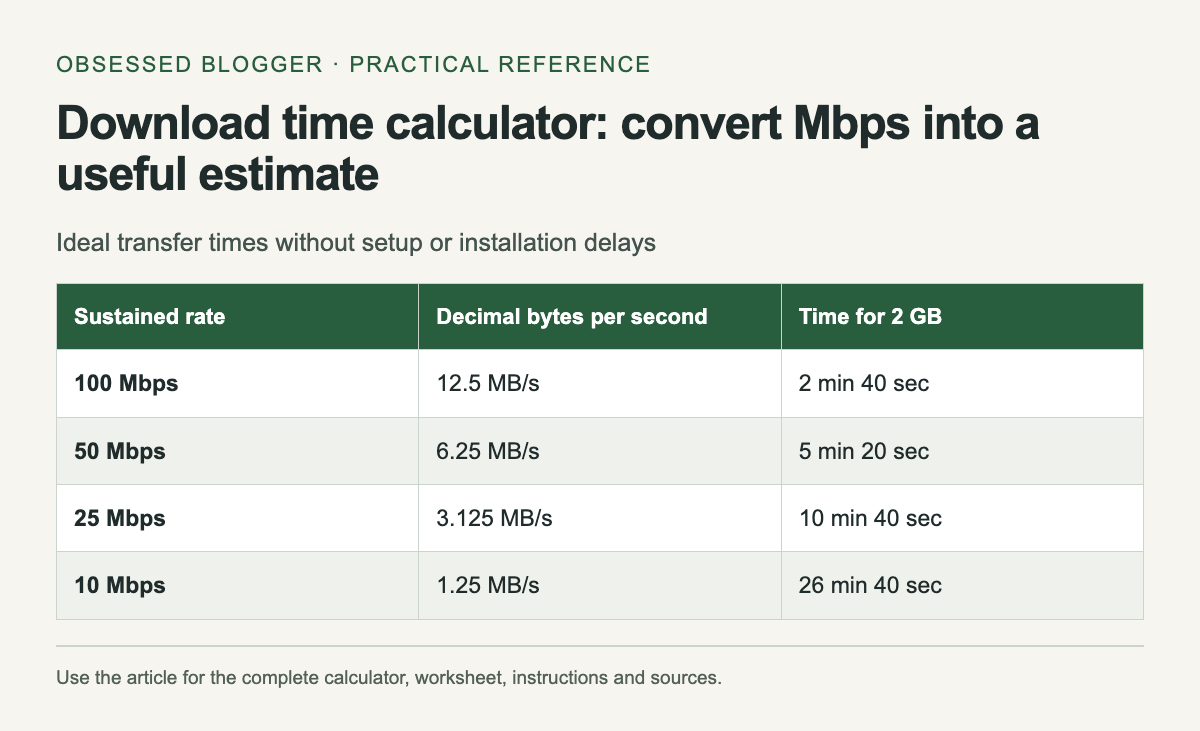
For a download measured in decimal gigabytes and a transfer rate measured in megabits per second, ideal seconds equal GB × 8,000 ÷ Mbps. A hypothetical 2 GB file at a sustained 50 Mbps takes 320 seconds, or 5 minutes 20 seconds, before allowing for additional delays.
The word sustained matters. A plan's advertised connection rate is not a promise that every server will deliver every file at that rate. Use a measured transfer rate from the relevant connection when possible, and treat the result as a planning estimate.
Keep bits and bytes separate
NIST's unit reference defines a byte as eight bits and distinguishes decimal from binary prefixes. Mbps uses megabits per second. MB/s uses megabytes per second. Under decimal units, dividing Mbps by eight gives the equivalent MB/s before considering transfer overhead.
For example, 80 Mbps corresponds to 10 MB/s as a unit conversion. If an application reports 10 MiB/s instead, that binary unit is different. This calculator deliberately uses decimal GB and Mbps. Convert a GiB file size first rather than entering it under a GB label.
Choose a planning rate
If a previous download sustained 40 Mbps on the connection you will use, that can be a more relevant input than a higher headline plan speed. Record whether the measurement was made over Wi-Fi or a wired connection and whether other transfers were running.
The calculator also accepts a percentage of the entered rate for a slower scenario. Its default 80% is a hypothetical planning assumption, not a measured efficiency figure or an industry standard. Change it to explore the effect of a lower sustained rate; do not present that scenario as a prediction with guaranteed accuracy.
Understand the parts it cannot time
The formula measures transfer of the stated bytes at the stated rate. It does not include waiting for a server, installing software, verifying files, unzipping an archive or restarting a device. A download manager may combine several of those stages in a single progress display.
If an update says it is downloading a small patch but later writes a much larger game installation, the download size and local disk work are different quantities. Use the transfer estimate for the network stage and leave room for the remaining steps when scheduling access to the device.
Use the estimate for a concrete choice
Suppose you need a large file before leaving a reliable connection. Enter its size, calculate an optimistic time and a slower scenario, then compare both with the time available. If the slower result leaves little margin, start earlier or choose a smaller legitimate download option if the provider offers one.
For uploads, use the upload rate instead of the download rate. The arithmetic is the same, but your connection may have different rates in each direction. Do not reuse a download measurement for a backup upload unless you have verified that it applies.
Recalculate when the evidence changes
Watch the early sustained rate rather than the first brief spike. If the rate settles far below your input, update the estimate. A transfer can also change speed later, so a countdown based on the current rate will naturally move.
Keep units attached to every recorded value. “2 at 50” is not enough to reproduce a calculation; “2 decimal GB at 50 Mbps” is. The reference table uses a hypothetical 2 GB file and steady rates. It shows why halving the rate doubles the transfer time without claiming any particular internet service will maintain those speeds.
| Sustained rate | Decimal bytes per second | Time for 2 GB |
|---|---|---|
| 100 Mbps | 12.5 MB/s | 2 min 40 sec |
| 50 Mbps | 6.25 MB/s | 5 min 20 sec |
| 25 Mbps | 3.125 MB/s | 10 min 40 sec |
| 10 Mbps | 1.25 MB/s | 26 min 40 sec |
Calculate your result
Values stay in this page. The worked example also works without JavaScript.
0 comments:
Post a Comment